Mastering Laravel Login Code: Build Secure & Scalable Authentication
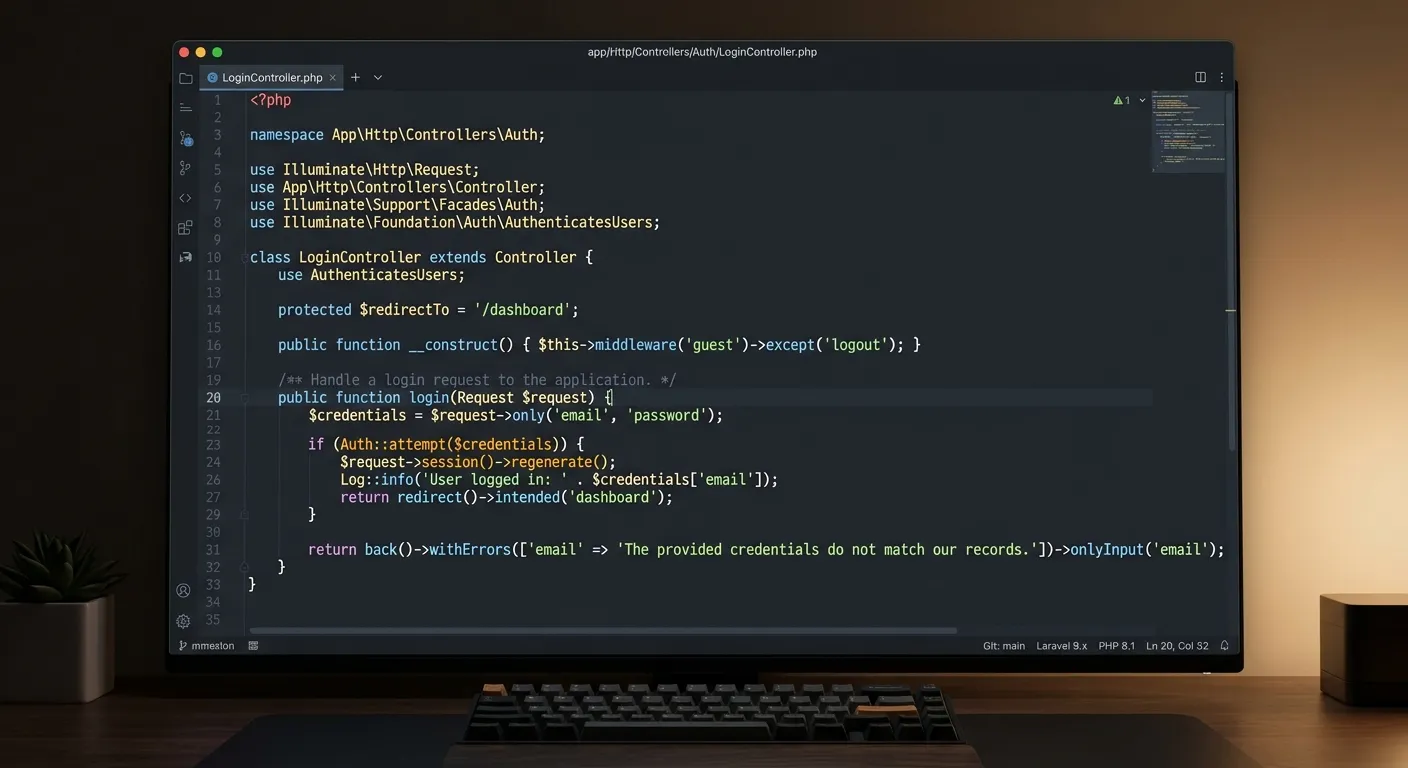
Implementing robust Laravel Login Code is the cornerstone of any secure web application. This comprehensive guide delves deep into authentication architecture, security best practices, and advanced techniques to help developers and businesses hire top talent for building enterprise-grade login systems that scale.
Laravel Authentication: A Multi-Faceted Overview
Laravel's authentication system is incredibly versatile. Whether you're building a simple blog or a complex SaaS platform, understanding these core categories is essential.
The Foundation of Secure Login Systems
Laravel's built-in make:auth scaffolding provides a production-ready starting point. At its core, Laravel login code revolves around the User model, Authentication guards, and the Eloquent ORM. The framework handles session management, password hashing (using Bcrypt), and"remember me" functionality out-of-the-box.
A typical login controller leverages the AuthenticatesUsers trait, which contains methods for showing the login form, validating credentials, and handling the authenticated session. Understanding this flow is critical before customizing or extending the system, especially when planning a user migration from another platform.
Pro-Tip:
Always override the default authentication logic in a dedicated AuthController rather than modifying the core trait. This ensures your customizations survive framework updates and makes your codebase more maintainable for teams you might hire in the future.
Why Invest in Robust Laravel Login Code?
A well-architected authentication system is more than just a login form; it's a critical business asset that impacts security, user experience, and scalability.
Enterprise-Grade Security
Laravel employs Bcrypt hashing, CSRF protection, and prepared statements by default, mitigating common vulnerabilities. Properly implemented Laravel login code forms the bedrock of your application's performance optimisation and security posture, preventing costly breaches.
Scalable Architecture
From simple web apps to platforms requiring multi-tenancy, Laravel's authentication guards and providers scale elegantly. This flexibility is a core reason businesses choose to migrate, as explored in our case study on migrating your entire WordPress site to Laravel without losing data.
Rapid Development
Laravel's artisan commands and pre-built traits slash development time for standard authentication flows. This efficiency allows teams to focus on unique business logic and customizations that leverage the full Laravel platform, rather than reinventing the security wheel.
A Deep Dive into Laravel Login Code Implementation
Step-by-Step: Building a Custom Authentication System
While scaffolding is useful, understanding the manual build is crucial for customization. Let's break down the key components:
1. The User Model & Migration
The foundation is the User Eloquent model, which implements the Authenticatable contract. The corresponding migration must include essential fields like email, password, and remember_token. Adding roles, permissions, and profile fields at this stage is easier than retrofitting later.
// Database Migration Example
Schema::create('users', function (Blueprint $table) {
    $table->id();
    $table->string('name');
    $table->string('email')->unique();
    $table->timestamp('email_verified_at')->nullable();
    $table->string('password');
    $table->string('role')->default('user'); // Custom field
    $table->rememberToken();
    $table->timestamps();
});
2. Controllers, Routes, and Middleware
The login logic resides in a controller (e.g., LoginController). Key methods include showLoginForm(), login(), and logout(). Routes are protected using the auth middleware. For complex applications, consider creating a dedicated middleware for role-based access, a common requirement when integrating with legacy WordPress Blocks permission systems.
Expert Insight:
Never store plain-text passwords. Laravel's Hash::make() uses Bcrypt by default. When migrating users from other systems (like WordPress), you may need to rehash passwords upon first login if the legacy system used a weaker algorithm. This is a critical step in any WordPress to Laravel migration project.
3. Frontend Integration & Validation
The login form should include CSRF token protection (@csrf), validation for email and password fields, and clear error messaging. Using Laravel's validation in the controller ensures logic remains server-side, enhancing security. For a modern UI, consider integrating Laravel with Inertia.js or Livewire for reactive components that can replace static WordPress Blocks.
Advanced Scenarios: API Authentication & Social Logins
For single-page applications (SPAs) or mobile apps, token-based authentication via Laravel Sanctum is the standard. It provides a simple way to issue API tokens and manage abilities (scopes). Social logins via Laravel Socialite reduce sign-up friction. Implementing these requires additional database fields (like provider and provider_id) and careful OAuth flow handling.
Mastering these advanced patterns is what sets elite developers apart. If your project requires such expertise, consider using our platform to hire top general doctors of code—senior Laravel developers who can diagnose and implement complex authentication architectures.
Security Checklist
-
Use
HTTPSin production for all login requests. - Implement rate limiting on login attempts to prevent brute force attacks.
- Enable email verification for user accounts.
- Regularly audit and update your Laravel and package dependencies.
- Log authentication events (successes & failures) for monitoring.
For a comprehensive look at platform-specific features, review the core features that set Waravel apart, many of which directly enhance authentication workflows.
Frequently Asked Questions on Laravel Login Code
Common questions and expert answers to help you navigate authentication challenges.
Fundamentally, Laravel uses an Object-Relational Mapper (Eloquent) and a more structured MVC architecture, whereas WordPress relies on a global wp_users table and hooks/filters. Laravel's system is more flexible for custom user roles and API-driven logins. However, migrating requires careful planning. Our WordPress Migration Tool automates much of this process, including user data transformation.
Additionally, replacing dynamic content tied to WordPress Blocks often requires rebuilding the frontend authentication state logic within a Laravel view component or JavaScript framework.
Several key packages are industry standards:
- Laravel Sanctum: For lightweight API token authentication (ideal for SPAs).
- Laravel Passport: For full OAuth2 server implementation.
- Laravel Socialite: For social media login integration.
- Spatie Laravel-Permission: For advanced role and permission management.
- Laravel Jetstream/Fortify: For application starter kits with robust UI.
Choosing the right combination depends on your project scope. For a broader overview of essential tools, see our guide on top Laravel packages.
For most business applications, a battle-tested package like Spatie Laravel-Permission is recommended. It provides a clean, maintainable abstraction for roles, permissions, and guards. Building a custom system from scratch is time-consuming, error-prone, and makes it harder to onboard new developers you might hire later.
However, if your requirements are highly unique and integral to your business logic, a custom solution built on Laravel's native guards and policies might be justified. This decision should be made with senior architectural input, perhaps from experts found through our Laravel custom development services network.
Extremely critical. Authentication is a security-sensitive component. A general PHP developer might implement a working login, but a Laravel specialist will understand nuances like session drivers, guard customization, queue integration for notification emails, and proper validation exception handling. The specialist will write code that is secure, maintainable, and follows Laravel's conventions.
Investing in the right talent upfront prevents security vulnerabilities, technical debt, and costly refactors. For mission-critical applications, always prioritize hiring developers with proven Laravel authentication experience. Use our platform to hire staff today who possess this specific expertise.
Ready to Build or Scale Your Authentication?
Whether you're starting a new Laravel project, need to migrate a legacy WordPress login system, or require a complex multi-guard setup, having the right expertise is paramount. Well-crafted Laravel login code is the gateway to your application's security and user experience.
For more insights on building a powerful digital presence, explore our strategic brand building guide. To see real-world results, browse our case studies on successful platform migrations and rebuilds.
Real-World Implementation: From Theory to Production
Understanding the concepts is one thing; implementing them in a live, high-traffic environment is another. Here, we explore practical patterns and lessons learned from actual deployments.
Case Study: Multi-Tenant SaaS Platform
A B2B software company needed a single login portal for customers to access multiple, isolated application instances (tenants). The challenge was authenticating a user once, then determining which tenant(s) they had permission to access, and seamlessly logging them into the correct instance.
Solution: We implemented a central authentication service using Laravel Sanctum for API tokens. The User model had a polymorphic relationship to a TenantMembership model. Upon login, the system issued a JWT containing the user's ID and an array of accessible tenant IDs. A middleware on each tenant subdomain would validate the token and scope access to only the data for that specific tenant.
Key Takeaway: Decoupling the authentication service from the tenant applications provided immense scalability and simplified maintenance. This architecture is now a foundational pattern for businesses looking to unlock the power of Laravel for complex SaaS products.
Case Study: Migrating a High-Volume Membership Site
A popular online community with over 100,000 users on a legacy WordPress + BuddyPress setup required migration to Laravel. The primary concerns were preserving hashed passwords, transferring complex user meta, and replicating intricate role capabilities (e.g.,"Moderator,""Premium Member") into a Laravel permission system.
Solution: We used a custom data migration script alongside Waravel's tools. Since WordPress used older PHPass hashing, the script checked passwords on first login: if hashed with PHPass, it verified the password and then rehashed it using Laravel's Bcrypt, transparently updating the database. User roles were mapped to Spatie's Laravel-Permission package, and the frontend components that replaced WordPress Blocks were built with Livewire to handle dynamic, permission-aware content.
Key Takeaway: A phased migration strategy—moving data first, then enabling a parallel login system during a cutover period—was essential for zero downtime. This experience is detailed in our guide on migrating your entire WordPress site to Laravel without losing data.
Optimizing Laravel Login Code for Performance at Scale
Authentication is not just about security; it's a critical performance path. Under heavy load, inefficient login code can become a bottleneck. Here are advanced optimization strategies.
Database Indexing & Query Optimization
The default users.email field is unique, but performance degrades as the table grows. Ensure secondary lookups (e.g., on username, provider_id for Socialite) are also indexed. For applications using multiple guards (admin, api), consider the indexing strategy on the guard-specific tables (e.g., admins).
Example: Adding Composite Index for Faster Social Login Lookups
// In a database migration
Schema::table('users', function (Blueprint $table) {
    // A composite index for fast"find user by provider and provider ID"
    $table->index(['provider', 'provider_id']);
});

// This optimizes queries like:
$user = User::where('provider', 'github')
            ->where('provider_id', $githubId)
            ->first();
This simple change can drastically reduce query time for social login flows, a key part of overall performance optimisation.
Session Driver Selection & Caching Strategies
The default file session driver becomes a liability under load. For horizontal scaling, use database, redis, or memcached drivers. Redis is often the best choice, offering speed and advanced data structures. Furthermore, cache frequently accessed, static user data (like role permissions) after the first login to avoid repeated database queries on every request.
Scaling Tip:
When using token-based authentication (Sanctum/Passport), implement token caching. Store the hashed token and its associated user ID/abilities in Redis upon creation. This turns token validation from a database query into a fast cache lookup, dramatically improving API response times for authenticated requests.
Ensuring Long-Term Integrity: Testing & Maintenance
Robust Laravel login code requires a safety net of tests and a proactive maintenance plan. This is non-negotiable for business-critical applications.
Comprehensive Test Coverage
Your test suite should mirror the complexity of your authentication system.
- Feature Tests: Test full user journeys: registration, login, email verification, password reset, logout. Use Laravel's
actingAs()helper to simulate authenticated users. - Security Tests: Actively test for vulnerabilities. Write tests that attempt brute-force login (ensure rate limiting kicks in), submit invalid CSRF tokens, or try SQL injection in login fields.
- Integration Tests: If using Socialite, write tests that mock the OAuth provider response. For API tokens, test token creation, validation, and revocation flows.
- Edge Cases: Test"remember me" functionality across browser sessions, concurrent logins from different devices, and account lockout scenarios.
Maintaining this suite is a primary responsibility of any developer you hire for ongoing project work.
Proactive Maintenance Checklist
Authentication code cannot be"set and forget." Implement these maintenance practices:
- Dependency Updates: Subscribe to Laravel security advisories. Update
laravel/framework, Sanctum, Passport, and Socialite packages promptly, testing after each update. - Audit Log Review: Regularly review authentication logs. Look for patterns of failed logins from unusual IP ranges, which may indicate a targeted attack.
- Password Policy Reviews: Periodically reassess your password strength requirements and hashing algorithm against current OWASP guidelines. Laravel allows you to change the default hashing driver (e.g., to Argon2) in future versions.
- Deprecation Monitoring: Laravel's authentication traits and methods evolve. Monitor deprecation warnings in your logs and plan refactoring of custom overrides before major version upgrades.
- Third-Party Provider Updates: OAuth providers (Google, Facebook) regularly change their API requirements. Ensure your Socialite implementation and stored scopes are updated to avoid login failures for users.
Adopting these testing and maintenance disciplines transforms your authentication system from a potential liability into a documented, reliable, and scalable asset. For teams lacking in-house expertise, partnering with a specialized agency through our Laravel custom development services can establish these critical processes from day one.