WordPress Blocks: The Ultimate Guide to Mastering the Modern Content Editor
Unlock the full potential of your website's content creation with this definitive, in-depth exploration of WordPress Blocks. From basic paragraphs to dynamic layouts, learn how to build, customize, and optimize your site like a professional developer.
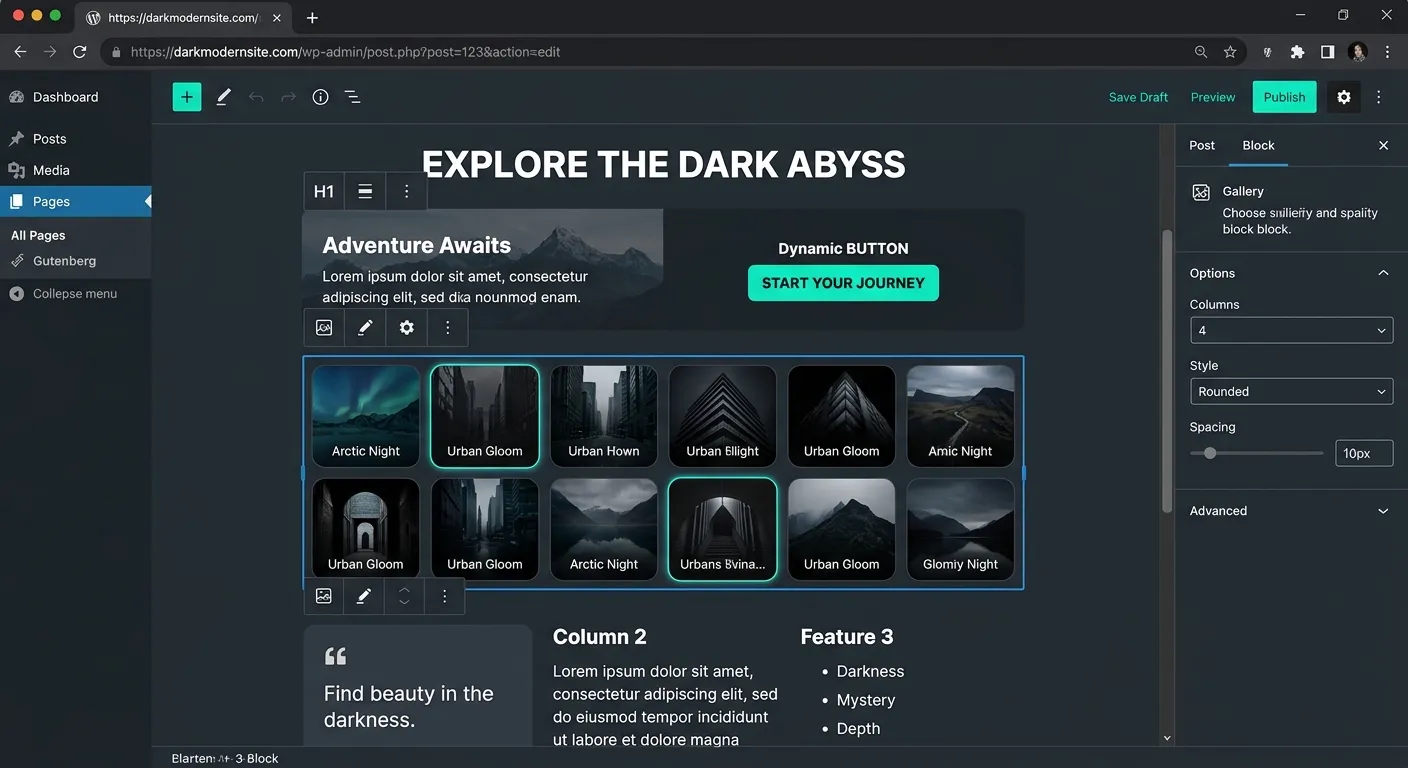
A Multi-Faceted Look at the Block Editor
The WordPress Block Editor, or Gutenberg, is not a single tool but an ecosystem. Explore its core facets through the categories below.
Understanding the Block Fundamentals
At its heart, the Block Editor revolutionizes content creation by breaking down every element—paragraphs, images, headings, buttons—into discrete, movable units called WordPress Blocks. This modular approach provides unprecedented layout control without needing to touch a line of code.
Each block operates as a self-contained component with its own toolbar and settings sidebar. This separation of content and presentation allows for cleaner HTML output and more predictable styling. The learning curve is gentle for beginners, yet the system is powerful enough to build complex landing pages that rival custom-coded solutions.
Pro-Tip: Keyboard Mastery
Speed up your workflow dramatically. Use / to instantly insert a new block, Ctrl+Shift+D to duplicate a selected block, and arrow keys to navigate between blocks seamlessly.
Leveraging Advanced Block Features
Beyond basic content, WordPress Blocks enable sophisticated design systems. The Group and Container blocks allow you to apply shared styles or background colors to entire sections. The Reusable Blocks feature lets you save complex block assemblies (like a call-to-action with text and button) as a single unit to deploy across your site, ensuring brand consistency.
For developers, the introduction of Block Patterns and Block Themes represents a paradigm shift. You can now define pre-designed section layouts (like hero areas, feature grids, or testimonials) that users can insert with one click, combining the flexibility of blocks with the guardrails of professional design. This is a key component of modern strategic brand building, ensuring every page maintains visual integrity.
Navigating the Expanding Block Universe
The true power of blocks lies in their extensibility. Thousands of third-party blocks are available via plugins, adding functionality like complex forms, interactive sliders, pricing tables, and even e-commerce product displays. This ecosystem turns WordPress from a blogging platform into a full-fledged visual application builder.
However, this abundance can lead to performance bloat. A site overloaded with block plugins from various sources can suffer slow load times. This is a primary reason many enterprises consider a platform shift to a more performant, integrated system like a modern Laravel platform, which offers similar composability without the overhead. For those seeking a middle ground, exploring optimized WordPress tools is essential.
Key Benefits & Features of the Block Paradigm
Visual, Intuitive Editing
What You See Is What You Get (WYSIWYG) editing is fully realized. Drag, drop, resize, and style content in real-time, eliminating the guesswork and constant previewing required by the classic editor.
Unprecedented Layout Freedom
Create complex, multi-column layouts, media-text combinations, and overlapping elements without relying on shortcodes or custom HTML. The Columns block alone revolutionized page design for millions of users.
Cleaner, Semantic Code Output
Blocks generate modern, lean HTML with appropriate semantic tags and minimal inline styling. This results in better SEO, improved accessibility, and sites that are easier to maintain and migrate, a crucial factor if you ever execute a WordPress to Laravel migration.
Future-Proof Foundation
The block editor is WordPress's present and future. Full Site Editing (FSE) allows you to design headers, footers, and templates using the same block interface, creating a unified design language across your entire site.
Enhanced Performance & Speed
Modern block themes are built with performance in mind, loading only the necessary CSS for blocks used on a page. This modular loading approach, when combined with proper performance optimisation techniques, can significantly improve Core Web Vitals scores.
Streamlined Team Collaboration
With a standardized, visual system, marketing teams, content writers, and designers can collaborate more effectively. There's less need for developers to be involved in routine content updates, freeing them for higher-value work. Need to hire top talent to manage or extend your block-based projects? A clear, block-based content strategy makes defining technical requirements much simpler.
From Classic to Block: A Paradigm Shift in WordPress Development
The introduction of WordPress Blocks with Gutenberg in WordPress 5.0 marked the most significant change to the content management experience in over a decade. It moved WordPress away from a single textarea ("TinyMCE") towards a component-based architecture. This shift aligns WordPress more closely with modern front-end development practices seen in frameworks like React, which actually powers the block editor interface.
For developers, this meant a new way of thinking: creating custom blocks. A custom block is essentially a React component registered with WordPress, complete with its own edit function (for the admin UI) and save function (for the front-end output). This opens a world of possibility but also introduces complexity, requiring knowledge of JavaScript, React, and the WordPress REST API.
This complexity is a driving factor behind the search for alternatives. Some developers find that building custom functionality within a structured framework like Laravel offers more control and better long-term maintainability. For instance, creating a dynamic form or a custom data display in Laravel might involve writing clean Laravel login code and Blade templates, which can be more transparent and testable than wrestling with block API JavaScript. Exploring a Laravel CMS built with WordPress-like simplicity can offer the best of both worlds.
The Technical Anatomy of a Block
Every WordPress Block is defined by a JSON file (block.json) and corresponding PHP/JavaScript files. This metadata describes the block's name, icon, category, and attributes (its editable data points).
- Edit Function: A JavaScript function that renders the block's interface in the editor.
- Save Function: A JavaScript function that returns the static HTML to be saved to the database and rendered on the front end.
- Attributes: The block's dynamic data (e.g., text content, image IDs, color choices).
- Supports API: Declares which block-level features are enabled (alignments, colors, spacing).
Understanding this anatomy is key to both creating custom blocks and troubleshooting block-related issues.
A Taxonomy of Common WordPress Blocks
Text & Media Core
Paragraph, Heading, List, Quote, Image, Gallery, Video, Audio, File.
Design & Layout
Columns, Group, Row, Stack, Buttons, Separator, Spacer.
Widgets & Embeds
Shortcode, Archives, Calendar, Social Icons, YouTube, Twitter, Spotify.
Theme Blocks
Site Logo, Site Title, Navigation, Post Content, Query Loop, Template Part.
Expert Insight: Managing Block-Based Sites at Scale
As your site grows, managing content created with WordPress Blocks requires strategy. Reusable Blocks are your best friend for global elements. However, be cautious of"block lock-in"—content saved in proprietary block formats can be challenging to migrate to another system.
For large-scale or enterprise projects, consider the long-term content portability. Automated migration tools, like those offered by platforms such as Waravel, are designed to parse block content and convert it into a structured format suitable for a Laravel application, preserving your SEO and data integrity. Learn more about this process in the guide How To Migrate Your Entire WordPress Site To Laravel Without Losing A Single Byte Of Data.
Optimizing Performance with Blocks
While powerful, a page with dozens of complex blocks can become heavy. Follow these best practices:
- Lazy Load Media: Ensure image and video blocks have lazy loading enabled.
- Limit Third-Party Blocks: Audit your plugins. Each block plugin adds CSS and JavaScript; use only what you need.
- Use Core Blocks When Possible: Core WordPress blocks are generally more optimized than third-party equivalents.
- Consider a Block Theme: Modern block themes load CSS on-demand, only for the blocks used on the page.
If performance remains a critical issue after optimization, it may indicate that your project has outgrown the typical WordPress environment. Transitioning to a high-performance Laravel backend, while using the block editor for content creation via a headless setup, is a strategy employed by many high-traffic sites. Discover the potential in our resource Unlock The Power Of Laravel.
Frequently Asked Questions About WordPress Blocks
Get clear, actionable answers to the most common questions surrounding the block editor.
Officially, the Classic Editor plugin is deprecated. While it may still function, it is not recommended for new projects. The block editor is WordPress's future. All theme and plugin development is now focused on the block system. Embracing blocks is essential for long-term compatibility and access to new features like Full Site Editing. If your team struggles with the transition, it might be a sign to hire a developer with specific Gutenberg expertise to facilitate training or build custom blocks that match your workflow.
Not inherently. A well-optimized block-based site using a modern block theme can be extremely fast because CSS is loaded modularly. Performance issues arise from excessive use of poorly coded third-party block plugins, oversized images, and lack of caching. Proper performance optimisation is non-negotiable. If you're consistently hitting performance walls, it could be an architectural limitation, making a case for exploring a more streamlined platform built on a framework like Laravel.
WordPress includes a"Convert to Blocks" feature. When editing an old post, you can select the classic content block and choose"Convert to Blocks." This attempts to parse your HTML and shortcodes into native blocks. Success varies. For complex sites, manual cleanup is often needed. For large-scale migrations, especially if considering a platform change, automated tools are vital. A dedicated WordPress migration tool can handle this conversion as part of a larger move to a new system, ensuring content structure is preserved.
Yes, in a headless architecture. You can use WordPress solely as a content management backend (taking advantage of the familiar block editor) and use its REST API or GraphQL to feed content into a custom frontend built with Laravel and a tool like Inertia.js or as a pure API consumer. This combines the editorial experience of WordPress Blocks with the robustness, scalability, and custom Laravel login code and business logic of a Laravel application. This approach is detailed in platforms that facilitate such integrations, allowing you to migrate WordPress to Laravel effortlessly while keeping the editing interface intact.
Core WordPress Blocks should retain their basic functionality and styling, though their appearance will adapt to the new theme's styles. However, blocks provided by your old theme or plugins will likely break or disappear, displaying a"missing block" message. This is a significant risk with heavily customized block-based sites. Planning for user migration and content portability is crucial. Using primarily core blocks and carefully vetted, popular block plugins minimizes this risk. For maximum future-proofing, a platform-agnostic content structure is ideal.
Ready to Master or Move Beyond WordPress Blocks?
Whether you're looking to build a world-class website with advanced WordPress Blocks or your project demands the scalability, performance, and clean architecture of a modern Laravel application, having the right team is essential. The future of web content is modular and visual—ensure your platform and your people are prepared.
Explore our case studies to see how businesses have successfully navigated the transition from complex WordPress setups to streamlined, powerful Laravel platforms.