Laravel Cms Filament: Build, Admin, and Scale Content with Confidence
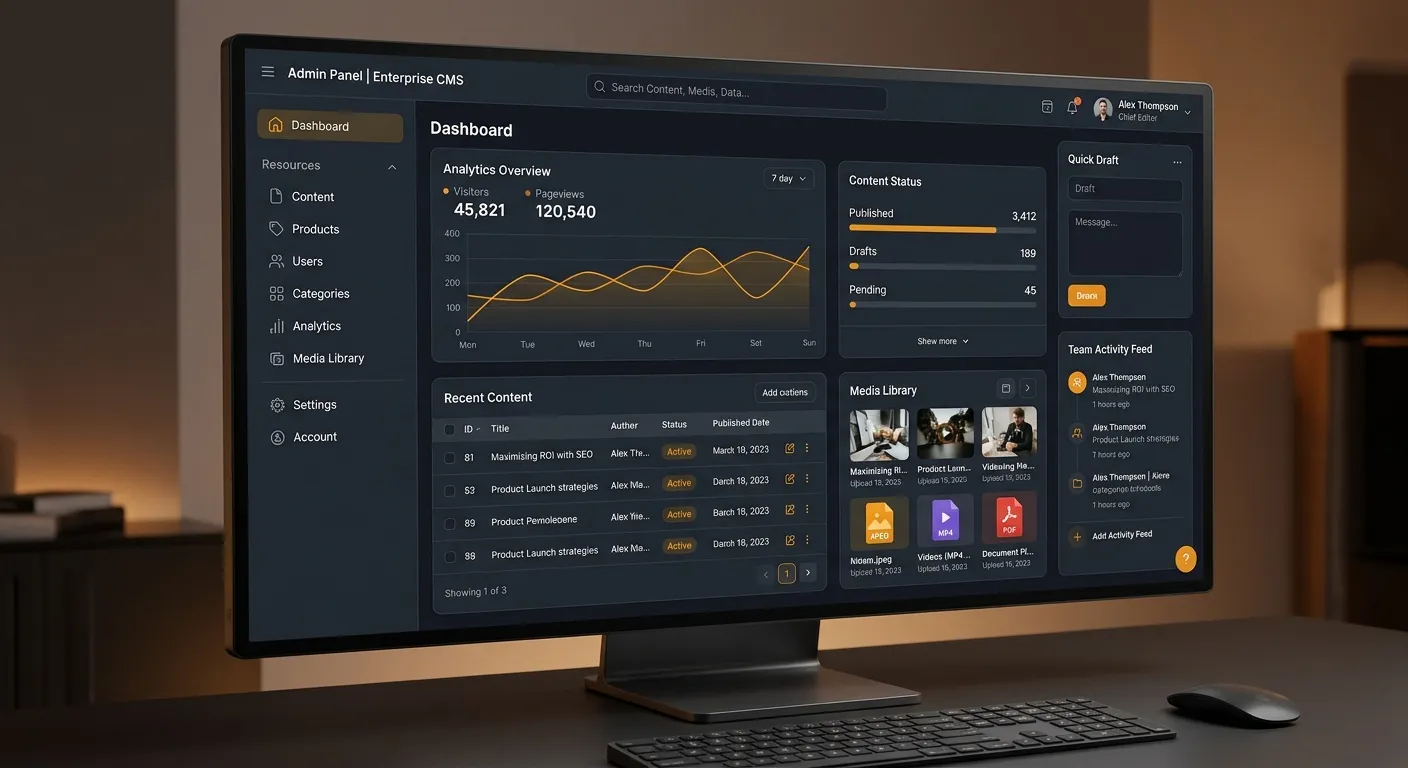
Laravel Cms Filament is no longer just a developer curiosity; it is a serious foundation for teams that want a custom, maintainable, and highly functional content management layer inside Laravel. It gives editors a clean admin interface while giving developers a structured way to define resources, forms, tables, pages, and permissions in code. For many modern Laravel applications, Filament becomes the bridge between backend logic and day-to-day publishing workflows.
Whether you are building a marketing portal, product catalog, internal knowledge base, or client-facing admin suite, this guide covers practical patterns, security considerations, and hiring decisions that matter most. If your project needs specialized talent, you can hire staff today through a focused job post and connect with Laravel professionals who understand Filament, Eloquent, authentication, and modern CMS architecture.
About Laravel CMS Filament
Filament is an open-source Laravel application framework centered on an admin panel, but its value for CMS work is much broader. It provides resources, forms, tables, pages, widgets, navigation, and authentication patterns that let developers build a custom CMS without creating every CRUD screen from scratch. Instead of choosing between a rigid blog engine and a bare Laravel project, Laravel Cms Filament gives teams a structured middle path: you define models, resources, fields, permissions, and workflows in code, while editors receive a polished interface.
This approach is especially useful for businesses that need editorial control, role-based publishing, media management, SEO fields, multilingual content, or API integration. A traditional CMS may offer convenience, but custom Laravel systems offer flexibility. Filament reduces the cost of that flexibility by handling the repetitive admin UI layer. If you are comparing options, a Laravel CMS comparison can help you decide when Filament is better than packaged CMS solutions and when a more opinionated platform is preferable.
The real advantage is not visual polish alone. It is the combination of the Laravel ecosystem, Eloquent models, route protection, and a UI layer that reduces repetitive CRUD code. When you unlock the power of Laravel with a modern admin layer, your content system becomes an application, not just a publishing tool. This is why Filament is popular for custom portals, product-driven content systems, internal tools, and admin-heavy SaaS platforms.
Pro tip: Do not start by installing a full CMS package and then fighting it. Start by mapping your content types, editors, permissions, and migration requirements. Then decide whether Filament resources, pages, and forms can model those needs cleanly.
Interactive Multi-Category Overview
Use the tabs below to compare the main categories of a Laravel Cms Filament implementation. Each category represents a decision area that affects architecture, developer velocity, and editor experience.
Admin Panel and Dashboard
The admin panel is the visual heart of a Laravel CMS built with Filament. It centralizes navigation, dashboards, resource lists, and global widgets. Editors can log in, search content, filter records, and perform routine publishing tasks without touching code. For stakeholders, the dashboard can surface recent edits, pending approvals, traffic insights, or integration health.
A well-designed admin panel reduces support requests because editors can self-serve. Instead of emailing developers to change a heading, update metadata, or publish a page, they use a structured form. That makes Filament ideal for teams that need both developer control and business independence.
- Custom navigation groups for pages, media, users, taxonomies, and integrations.
- Global search and quick actions for high-volume editorial teams.
- Dashboard widgets for metrics, recent activity, and system status.
- Consistent design tokens that make the CMS feel like a product, not a patchwork.
Content Management
Content management is where Filament becomes more than an admin panel. Resources map to Eloquent models and expose fields, relationships, blocks, repeaters, media, and status controls. You can build blog posts, landing pages, product records, FAQ entries, case studies, documents, and custom taxonomies as structured resources.
The important point is control. A custom Laravel Cms Filament setup can enforce required SEO fields, validation rules, workflow states, and editor permissions. It can also connect content to APIs, queues, search engines, and analytics without forcing your database schema into a generic CMS shape.
- Rich text editors with image insertion, link controls, and embed support.
- File uploaders and media libraries for reusable assets.
- Relationship fields for categories, tags, authors, and related content.
- Workflow fields such as draft, review, published, scheduled, and archived states.
Developer Workflow
Filament fits naturally into Laravel’s developer workflow. Resources are classes. Forms are declarative. Tables are configured with columns, filters, actions, and bulk actions. Pages are Livewire components under the hood, which makes it easy to extend behavior without leaving the Laravel ecosystem.
For teams using Git, code review, testing, and deployment pipelines, this is a major advantage. A CMS admin UI can be versioned like application code. That is far more predictable than customizing third-party CMS plugins through UI-only configuration screens.
- Artisan-style resource generation and clear class structure.
- Reusable form and table components across multiple resources.
- Testing-friendly architecture for validation, authorization, and integration logic.
- Compatibility with Laravel queues, events, notifications, and packages.
Security and Authentication
Security is non-negotiable in any CMS. Filament provides authentication scaffolding, but production systems should not rely on defaults alone. You need role-based access control, policy enforcement, audit logs, password rules, session controls, and protection against unauthorized resource access. If you implement a Laravel Email Login flow, make sure login attempts, password resets, and email verification are handled carefully.
A strong Laravel Cms Filament implementation treats authentication as application logic, not just a login screen. Editors should only see the resources they are authorized to manage, and every destructive action should be traceable.
- Policies and gates for resource-level authorization.
- Role-based permissions for editors, reviewers, publishers, and administrators.
- Secure Laravel Email Login with rate limiting and verification.
- Audit trails for content changes and user actions.
Key Features and Benefits
A modern Laravel CMS is not just about editing pages. It is about giving teams a reliable system for creating, reviewing, publishing, and measuring content. These benefits make Laravel Cms Filament attractive for enterprise and product-driven projects.
Declarative Forms
Build complex content editing screens with fields, sections, tabs, repeaters, and relationship inputs. Forms remain readable in code, which makes validation, customization, and testing easier than opaque admin configurations.
Powerful Tables
Tables are not just lists. They support filters, searches, sorting, bulk actions, row actions, and detailed views. For editorial teams, tables become operational dashboards where users can manage content at scale.
Custom Pages
Custom pages let you build admin screens that are not tied to a single model. Use them for reports, settings, onboarding, integrations, or approval queues that need a workflow beyond standard CRUD.
Media Management
Media libraries and file uploaders help teams reuse images, documents, and assets across resources. Good media design reduces duplicate uploads, improves page speed, and keeps brand assets organized.
Role-Based Workflows
Role-based workflows ensure the right people see the right content and take the right actions. Editors can draft, reviewers can comment, publishers can approve, and admins can enforce policy.
SEO and Metadata
SEO fields such as title tags, meta descriptions, canonical URLs, open graph images, and structured data controls should be part of the editing experience. Filament makes these fields visible and validation consistent.
Deep Dive: Building a Production-Ready Laravel CMS with Filament
The best Laravel CMS projects start with a clear content model. Before building screens, define your resources, relationships, statuses, and permissions. Filament works best when your database and application logic are deliberate, not improvised.
Model Your Content Before You Build Screens
Start with the database. Your CMS should have clean tables for posts, pages, categories, media, authors, taxonomies, and settings. Then create Filament resources that mirror those models. Avoid putting too much logic in a single JSON column unless you need flexible blocks. Structured fields make validation, migration, and reporting easier.
Design Resources Around Editorial Jobs
A resource should support the actual job of the editor. A blog post may need a title, slug, body, excerpt, image, tags, author, publish date, and SEO fields. A product record may need price, inventory, specs, images, and category relationships. Design forms around these workflows, not around abstract admin convenience.
Use Tables for Operations
Tables should help teams triage content. Add filters for status, author, category, date, and search terms. Include bulk actions for publish, archive, assign, and export. A well-built table can reduce time spent managing large libraries of content and make the admin panel feel like a real productivity tool.
Build Custom Pages for Business Logic
Custom pages are useful when your admin needs more than CRUD. Build pages for content calendars, approval queues, integration health, analytics summaries, and onboarding checklists. These pages connect the CMS to real operational needs and make Filament feel like a complete application layer.
Expert insight: Treat every content field as a contract with editors. If a field is required, validate it. If a value changes a route or SEO output, test it. If a status affects public visibility, document it clearly.
For a practical look at the Laravel tooling that supports this kind of work, watch the walkthrough below. It covers the daily workflow of developers building modern Laravel applications and admin experiences.
Authentication, Laravel Email Login, and Admin Safety
Authentication is the first place where many CMS projects become fragile. Filament gives you a starting point, but you still need a clear authorization model. Decide who can create, edit, publish, delete, restore, and approve content. Then enforce those rules with Laravel policies, gates, and middleware.
A Laravel Email Login flow should be secure by default. Add rate limiting, password complexity rules, email verification, and audit logging. If editors use shared accounts, stop the practice and require individual credentials. Individual access makes audits meaningful and reduces accidental data loss.
- Restrict destructive actions to trusted roles.
- Log content changes with user identity and timestamps.
- Rate login attempts and password reset requests.
- Test authorization before deploying new resources.
Pro tip: Never assume that hiding a menu item is security. Always protect routes, actions, and data access at the policy level, especially when editors have different permissions.
Migration, Performance, and Scaling
Many teams start with WordPress, Drupal, a legacy CMS, or a custom admin panel. A Laravel Cms Filament project should not be treated as a simple screen swap. It requires data mapping, URL preservation, media migration, and user account transition. A structured WordPress to Laravel migration plan protects SEO and content history.
Performance should be designed into the CMS from day one. Large content libraries need indexed columns, cached navigation, paginated tables, lazy loaded relationships, and optimized image pipelines. If your admin panel feels slow, review queries, eager loading, and queue jobs before rebuilding the UI. The best results come from combining Laravel fundamentals with disciplined performance optimisation practices.
For complex projects, consider whether you need a fully custom CMS or a hybrid platform where Filament handles admin workflows and public pages are rendered through dedicated controllers, APIs, or static generation. This separation can improve speed, security, and long-term maintainability.
Actionable advice: Before migration, audit redirects, featured images, author archives, taxonomy pages, and scheduled content. These are the areas where poorly planned CMS migrations usually damage traffic.
Practical Tips for Teams Using Laravel Cms Filament
- 1. Document your content model first. Create a simple spreadsheet or diagram that lists every content type, field, relationship, status, and permission. This prevents late-stage database changes and keeps developers aligned with editorial needs.
- 2. Keep field labels consistent. Editors should not see “summary” in one resource and “excerpt” in another if they mean the same thing. Consistent language reduces training time and prevents content mistakes.
- 3. Use validation and helper text. Filament forms can include descriptions, hints, and validation rules. Use them to prevent broken slugs, missing SEO data, oversized images, and unsupported HTML.
- 4. Build reusable form sections. SEO, social sharing, publishing, and media fields often repeat across resources. Create reusable form components so updates happen in one place instead of across dozens of admin screens.
- 5. Protect admin routes with tests. Authorization bugs are common in CMS projects. Write tests that confirm editors cannot publish, delete, or access resources outside their assigned scope.
- 6. Treat the admin panel as a product. Your editors will use it every day. Invest in navigation, loading states, empty states, search behavior, and clear error messages. A polished admin panel increases adoption and reduces support requests.
Frequently Asked Questions
Ready to Build or Hire for Laravel CMS Filament?
A successful Laravel CMS project depends on clear architecture, secure authentication, strong editorial workflows, and developers who understand both Laravel and Filament. Whether you are launching a new system or migrating from WordPress, the right team can reduce risk and accelerate delivery. Review the modern CMS guide to strengthen your content strategy before you build.