Mastering Laravel CMS CI/CD: Automate Your Deployment & Scale Your Development Team
A comprehensive guide to implementing robust Continuous Integration and Continuous Delivery pipelines for your Laravel CMS, accelerating development and ensuring flawless releases.
Speed & Reliability
Automated testing and deployment eliminate human error, ensuring your Laravel CMS updates are released faster and with greater confidence.
Team Scalability
A standardized CI/CD process allows you to seamlessly onboard new developers and manage contributions from a distributed team.
SEO Integrity
Automated pipelines can integrate tasks like Laravel Google Search Console integration, preserving rankings after every deployment.
Building Your Laravel CMS CI/CD Pipeline: A Step-by-Step Blueprint
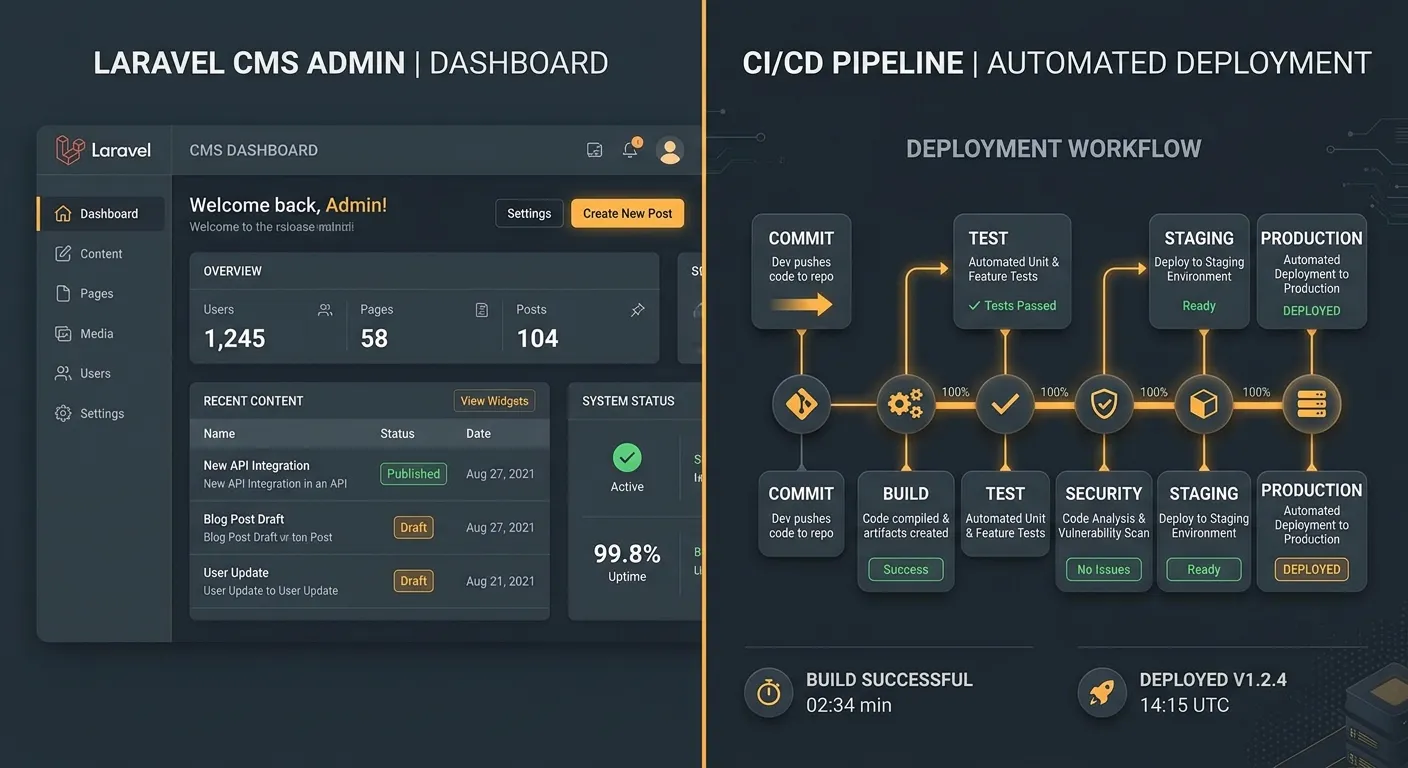
Implementing CI/CD for a content management system like Laravel requires a strategy that balances developer agility with content stability. The goal is to automate the journey from code commit to live production without disrupting the editorial workflow.
Core Pipeline Stages
- 1 Code Commit & Pull Request: Developers push features or fixes to a version control branch (e.g., Git). This triggers the pipeline automatically.
- 2 Automated Testing: The pipeline runs a suite of tests—unit, feature, and browser tests—specific to your Laravel CMS to catch regressions instantly.
- 3 Build & Asset Compilation: Dependencies are installed via Composer, and frontend assets (CSS, JavaScript) are compiled for production.
- 4 Deployment to Staging: The built application is deployed to a staging environment that mirrors production for final validation.
- 5 Production Deployment: After approval, the same build is deployed to the live server, often using zero-downtime strategies.
Essential CI/CD Tools & Integrations
Popular services like GitHub Actions, GitLab CI/CD, and Jenkins can orchestrate your pipeline. For Laravel, ensure your configuration includes steps for environment variable management, database migrations, and clearing caches post-deployment.
Leveraging a platform like Waravel can simplify this further, providing a managed Laravel CI CD CMS environment with built-in deployment tooling.
A critical but often overlooked step is Laravel Google Search Console integration. Your CI/CD pipeline can be extended to automatically generate and submit XML sitemaps after deployment or ping search engines about updates.
This ensures your SEO equity is maintained, a vital concern when migrating or updating a CMS. Learn more about preserving SEO in our guide on migrating WordPress to Laravel without data loss.
A CMS introduces unique challenges: user-uploaded media, database-driven content, and real-time configurations. Your pipeline must handle these idempotently—database migrations should be safe, and media should be symlinked or stored in a persistent cloud service.
Solutions like Waravel's no-code CMS are designed with automation in mind, making them ideal for CI/CD workflows.
Pro-Tip: The Content Freeze Myth
You don't need a"content freeze" for deployments. Design your Laravel CMS and pipeline to separate code deployment from database content. Use feature flags for major changes and ensure database migrations are backward-compatible. This allows your editorial team to publish freely, anytime.
Scaling Your Team with Automated Laravel CMS Workflows
A mature Laravel CI CD CMS pipeline is a force multiplier for your business. It reduces onboarding time for new developers, as the process of testing and releasing is standardized and documented. It also allows you to confidently hire remote Laravel developers, knowing they can integrate into a self-service, automated workflow without causing deployment bottlenecks or breaking the live site.
From Manual to Automated: A Case for Migration
If you're managing a legacy WordPress site or a manually deployed Laravel application, the shift to an automated CI/CD pipeline is your next strategic move. Manual deployments are error-prone and don't scale.
Tools exist to facilitate this transition. For instance, you can migrate WordPress to Laravel and immediately leverage a modern deployment stack. Explore the Waravel Packages directory for ready-made tools to accelerate this process.
Learn how to maintain SEO during a platform migration—a key CI/CD concern.
Ready to Implement Enterprise-Grade CI/CD?
Stop letting deployment complexity slow down your Laravel CMS development. Build a robust, automated pipeline that empowers your team and protects your live site.
Next Steps & Resources
Mastering Laravel CI CD CMS is an ongoing journey. Begin by documenting your current manual process, then automate one step at a time. Start with automated testing, then build, then deployment. Join the Waravel Community to discuss strategies, and if you need hands-on support, visit the official support portal.
For a deeper dive into choosing the right Laravel foundation, read our comparison of Laravel CMS alternatives. By integrating CI/CD into your Laravel CMS workflow, you're not just deploying code—you're building a scalable, efficient, and future-proof digital platform.