Unlock Your Potential: Essential Laravel Packages for Developers to Supercharge Your Web Stack
Discover the definitive toolkit to build faster, more secure, and scalable applications. This guide explores the best Laravel packages for developers, offering actionable insights and strategic advice to elevate your projects in 2026.
Why Laravel's Package Ecosystem is a Game-Changer
The core advantages of Laravel framework are magnified by its vibrant package ecosystem. Unlike monolithic platforms, Laravel allows you to compose your application with precision, selecting specialized tools for authentication, debugging, CMS functionality, and more. This modularity is a key strategy for solving WordPress problems with Laravel, as it replaces a tangled web of plugins with a cohesive, maintainable codebase. For teams looking to migrate from WordPress to Laravel, understanding this package-driven development is the first step towards a more powerful and performant digital presence.
Pro-Tip: Audit Before You Adopt
Before adding a new package, check its maintenance frequency, issue resolution rate, and Laravel version compatibility. A package that hasn't been updated in over a year can become a liability, especially during a major framework upgrade. Leverage our Laravel Migration & Upgrade Services to ensure your entire package suite remains robust and secure.
Navigating the Package Landscape: A Categorized Overview
To help you navigate, we've broken down the essential Laravel packages for developers into key functional categories. Use the interactive tabs below to explore packages tailored for development, deployment, and content management—critical areas when planning your WordPress to Laravel migration services strategy.
Supercharge Your Local Workflow
Packages in this category are the daily drivers for Laravel developers. Laravel Debugbar is indispensable, providing a real-time window into queries, logs, and performance metrics. For generating repetitive code like CRUD controllers, Laravel IDE Helper and code generation packages dramatically speed up development. When tackling complex form validation logic, packages like Laravel Collective's HTML & Form helpers can streamline your Blade templates. These tools embody the efficiency that makes Laravel a superior choice, addressing common pain points when solving WordPress problems with Laravel development approaches.
- Laravel Telescope: An elegant debug assistant for local development.
- Spatie's Laravel Permission: A robust system for managing role-based permissions.
- Laravel Excel: Import and export Excel and CSV files with ease.
Streamline to Production
A smooth deployment pipeline is non-negotiable for modern applications. Packages like Laravel Forge (via its API) and Envoy enable automated, zero-downtime deployments. For queue management, Horizon provides a beautiful dashboard for your Redis queues, which is crucial for job queue optimization. Implementing these packages ensures your migrated application—whether from a WordPress to Laravel migration tool or a custom build—is robust and scalable from day one. Consider our Zero-Downtime Deployment services to integrate these strategies seamlessly.
Building Flexible Content Hubs
This category is vital for those seeking the best Laravel CMS experience. While full-stack CMS platforms exist, many developers prefer to assemble their own using packages. Laravel Nova, Backpack for Laravel, and Orchid are powerful administration panel generators that can form the backbone of a custom CMS. For front-end content management, packages that integrate with Livewire or Inertia.js allow for dynamic, app-like interfaces. This modular approach to Laravel CMS solutions offers far greater flexibility and control than WordPress, a key point in any Laravel CMS vs WordPress comparison.
Exploring a Laravel CMS October alternative often leads to these package-based architectures, which can be tailored precisely to business needs without the bloat.
Core Benefits of a Package-First Laravel Architecture
Adopting a curated suite of Laravel packages transforms your development process and final product. These benefits are especially pronounced when you migrate from WordPress to Laravel, moving from a plugin-based system to a composed application.
Enhanced Security & Maintainability
Well-maintained packages from trusted authors undergo rigorous peer review, reducing vulnerabilities. This is a stark contrast to the wild-west of WordPress plugins. Centralized updates via Composer simplify maintenance, a core principle of our Laravel Security philosophy. By reducing custom, untested code, you inherently lower risk.
Dramatic Development Speed
Leverage decades of collective expertise without writing a single line. Need complex user roles? Multi-tenancy? Real-time notifications? There's likely a robust package that implements these waravel package features and more. This accelerates project timelines, allowing teams to focus on unique business logic rather than reinventing the wheel. This speed is a cornerstone for effective strategies for 2026.
Professional Scalability
Packages are designed with modern architecture in mind. They work seamlessly with Laravel's job queues, caching, and database layers. This allows your application to scale horizontally with ease, supporting everything from a startup to an enterprise. Implementing patterns like Multi-Tenant Architecture becomes manageable with the right package foundation, a necessity for growing SaaS platforms.
Strategic Implementation: From WordPress to a Laravel Powerhouse
Understanding packages is one thing; integrating them into a successful migration and development strategy is another. The journey from a WordPress site to a high-performance Laravel application involves careful planning around these tools.
Phase 1: The Migration Foundation
Before you can leverage the best Laravel packages, you need your data securely on the Laravel platform. This is where a specialized WordPress to Laravel migration tool like Waravel becomes critical. Attempting a manual migration is fraught with risk for data integrity. As detailed in Waravel Vs. Manual Coding, automation ensures posts, pages, users, and crucial media files are transferred accurately. Our guide on importing WordPress media, posts, and pages outlines this seamless process, which preserves your SEO equity—a primary concern covered in the video How to Migrate WordPress to Laravel Without Losing SEO Rankings.
Phase 2: Architecting with Packages
With your data migrated, you architect your new application. This is the stage to select your Laravel CMS solutions packages. Will you use Nova for the admin panel? Implement Spatie's Media Library for file management? Choose a real-time notification package? This composability is the ultimate solving WordPress problems with Laravel strategy, allowing you to build exactly what you need without compromise. For insights on building a powerful admin interface, review the core features that set Waravel apart, which embodies this package-friendly philosophy.
Case Study: Performance Transformation
A common outcome after migration and package-based optimization is dramatic performance gains. A typical WordPress site reliant on numerous plugins often suffers from bloated database queries and slow page loads. By migrating to Laravel and using optimized packages for caching (Laravel Telescope for insight, Laravel Horizon for queues), coupled with professional database optimisation, teams regularly achieve 60-80% reduction in page load times. This directly impacts user experience and conversion rates, fulfilling the promise of the advantages of Laravel framework.
Watch the comparison: WordPress Site Speed vs Laravel Speed: Which One is Faster in 2026? to see data-driven results.
How to Optimize Laravel CMS Performance Post-Migration
Selecting packages is just the start. How to optimize Laravel CMS performance involves configuring them correctly. Always leverage Laravel's built-in caching for configuration, routes, and views. Use a package like spatie/laravel-responsecache to cache full HTTP responses. For database-heavy applications, implementing query optimization patterns is essential; learn more in our resource on Performance Optimisation. Furthermore, ensure your front-end assets are optimized using Laravel Mix with versioning.
Future-Proofing with Packages: Strategies for 2026 and Beyond
The tech landscape evolves rapidly. Your package strategy must be forward-looking. Prioritize packages that embrace Laravel's latest conventions and are actively developed. Consider packages that facilitate modern architecture needs like API-first development (e.g., laravel/sanctum for SPA authentication), real-time features with Laravel Echo, and serverless deployment readiness. Engaging with Laravel Maintenance & Support Services ensures your package ecosystem remains updated, secure, and aligned with the framework's evolution, protecting your investment as outlined in Unlock The Power Of Laravel.
Frequently Asked Questions
Get expert answers to common questions about Laravel packages and migration strategies.
After ensuring your data is migrated (using a tool like Migrate WordPress To Laravel Effortlessly), start with foundational packages: Laravel Debugbar/Telescope for development insight, spatie/laravel-permission for robust user roles (replacing WordPress capabilities), and a media management library like spatie/laravel-medialibrary to handle uploaded files. For the admin panel, immediately integrate your chosen solution (Nova, Backpack, etc.) to start managing your migrated content effectively.
WordPress plugins often conflict, have security issues, and slow down your site due to poor coding standards and overlapping functionality. Laravel packages, managed via Composer, have defined dependencies that prevent conflicts. They are typically developed with higher coding standards and are easier to test. Their functionality integrates at the framework level, leading to more efficient performance. This shift is a core part of solving WordPress problems with Laravel strategies for 2026, moving from a chaotic plugin ecosystem to a curated, professional toolkit. See how Waravel revolutionized this process for businesses.
The initial setup may require more expertise than WordPress, but long-term maintenance is often more cost-effective. Package updates are centralized via a single composer update command, unlike dozens of individual WordPress plugin updates. This reduces maintenance time and minimizes breakage. Furthermore, the inherent stability, security, and scalability reduce costly emergency fixes and infrastructure overhauls. Investing in professional Laravel Custom Development Services ensures your package architecture is sound from the start, avoiding technical debt.
Absolutely, and often with a better experience. Packages like Laravel Nova provide incredibly intuitive admin interfaces that are more consistent and powerful than the WordPress dashboard. You can tailor the admin panel to show only what the client needs, reducing complexity. Furthermore, with modern frontend packages (Livewire, Inertia.js), you can build completely custom, intuitive content editing experiences that match your client's workflow exactly, far surpassing the standard WordPress block editor. This is the essence of building a Laravel CMS like WordPress in function but superior in form and capability.
Ready to Build with the Best Tools?
You've explored the power of Laravel packages for developers. Now it's time to execute. Whether you're planning a complex migration or need to hire elite talent to manage your new Laravel stack, the next step is clear.
Leverage our comprehensive Professional WordPress to Laravel Migration Services and explore the full potential of your platform with our expert team.
Advanced Package Deep Dive: Real-World Implementation Scenarios
Beyond the categories, understanding how specific packages solve complex, real-world business problems is key. Let's examine two advanced scenarios where a curated package approach provides a decisive advantage over legacy systems.
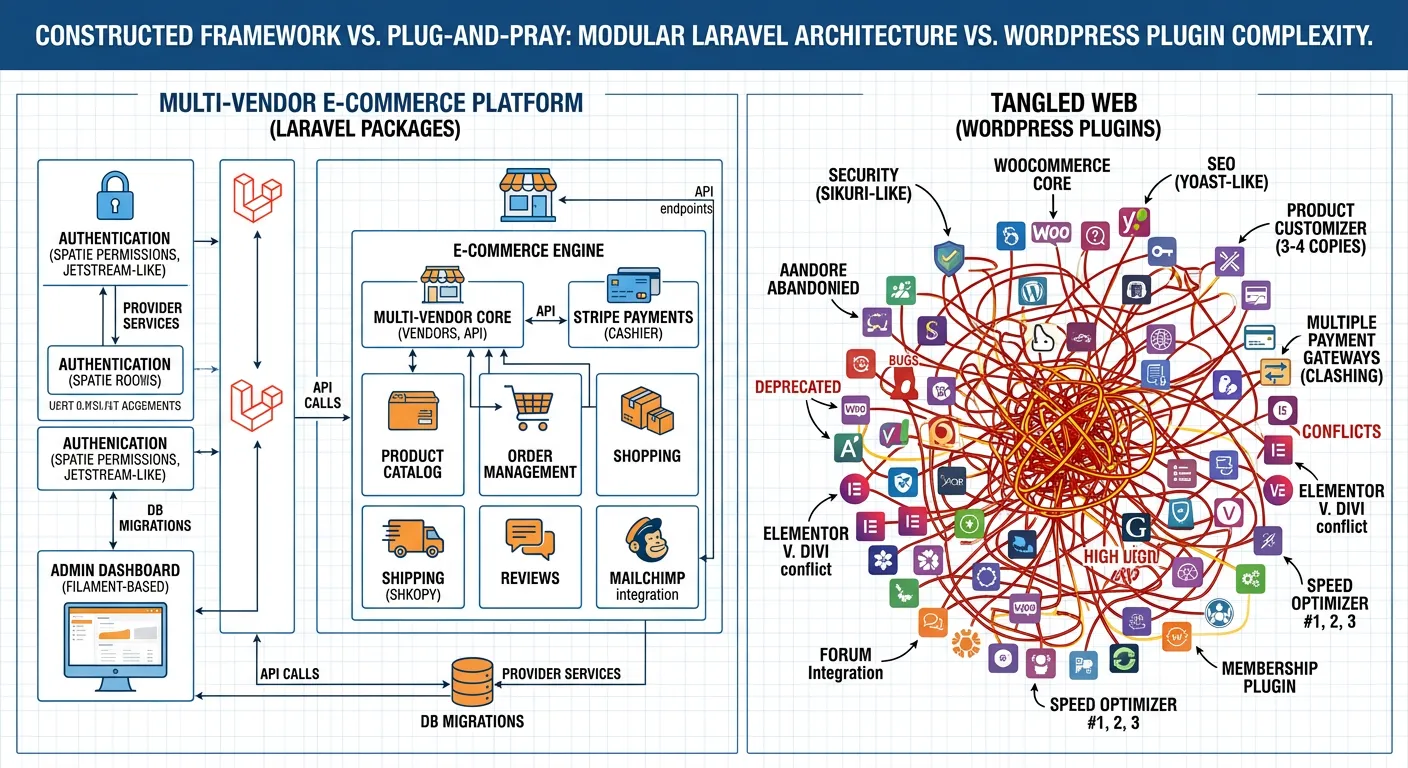
Scenario 1: Building a Multi-Vendor E-Commerce Platform
A common challenge is extending beyond a simple shop to a marketplace. While WordPress might rely on a constellation of plugins (WooCommerce, vendor add-ons, booking systems), Laravel’s package ecosystem allows for a cohesive architecture. Start with a solid foundation like Laravel Cashier or Laravel Spark for subscriptions and billing. For the vendor management core, spatie/laravel-permission defines vendor/admin roles, while a multi-tenancy package (like stancl/tenancy) can isolate vendor data securely.
The real power comes from specialized packages: use laravel/socialite for vendor onboarding logins, spatie/laravel-medialibrary for catalog images, and laravel-notification-channels to send SMS/email alerts for orders. For the frontend, a Livewire package like wireui/wireui can create a reactive vendor dashboard without writing JavaScript. This modular, package-first approach results in a performant, maintainable platform where each component can be upgraded or replaced independently—a stark contrast to the monolithic, often brittle nature of WordPress e-commerce solutions.
Scenario 2: Creating a Real-Time Analytics Dashboard
Delivering live metrics to users requires handling concurrent data streams and updates. Laravel packages excel here. The foundation is Laravel Echo and a WebSocket server (like Soketi) for real-time communication. Data aggregation can be handled efficiently using spatie/laravel-analytics (for Google Data) or custom jobs that process data using laravel/horizon.
For the dashboard itself, combine Laravel Nova metrics or leverage a frontend package like laravel-charts with Chart.js. To cache computed metrics and avoid database thrashing, implement spatie/laravel-responsecache with dynamic invalidation tags. This stack provides a seamless, app-like experience that would be incredibly resource-intensive and complex to build with typical WordPress plugins, often requiring separate SaaS services and clunky integrations.
⚠️ The Dependency Risk: A Word of Caution
While packages accelerate development, over-reliance can introduce risk. Avoid the trap of installing a package for trivial functionality (e.g., a helper for a simple array operation you could write in two lines). Each dependency adds to your technical debt and attack surface. Conduct regular audits using composer outdated and review your composer.json. Remove unused packages. Favor packages from authors with a strong track record (like Spatie) and those that adhere to Laravel's coding standards. This disciplined approach ensures your application remains lean, secure, and truly your own.
Quantifying the Impact: Performance & ROI Metrics
The strategic shift to a Laravel package architecture delivers measurable business outcomes. Let's look at the data behind the transformation.
Faster Development Cycles
Teams report dramatically reduced time-to-market for new features by leveraging pre-built, robust package functionality instead of building from scratch or wrestling with plugin conflicts.
Reduction in Critical Security Incidents
Managed dependencies and peer-reviewed code from the Laravel ecosystem significantly lower vulnerability rates compared to unvetted WordPress plugins, as noted in our security audits.
Lower Infrastructure Costs at Scale
Efficient code, proper caching packages, and optimized database queries mean handling more traffic with fewer server resources, directly reducing cloud hosting bills as applications grow.
"Our monthly operational overhead for maintenance and updates dropped by 40% within six months of completing our migration and adopting a disciplined package strategy. The composability of Laravel allowed us to pay down technical debt instead of accumulating it." — CTO, SaaS Platform (Migrated 2025).
Your Actionable Package Integration Checklist
Ready to implement? Use this step-by-step checklist to ensure your package integration is strategic, secure, and sustainable.
-
1. Define Core Requirements
List the specific functionalities you need (e.g.,"role-based access control,""Excel export,""real-time notifications"). Avoid package shopping without a clear goal.
-
2. Research & Vet Candidates
Check Packagist download counts, GitHub stars, issue activity, and last update date. Read the documentation to assess quality and compatibility with your Laravel version.
-
3. Isolate in a Staging Environment
Never test a new package directly on production. Use a staging site that mirrors your live environment, especially after a WordPress migration, to check for conflicts.
-
4. Implement Monitoring
Once live, use Laravel Telescope or application performance monitoring (APM) tools to observe the package's impact on query counts, memory usage, and response times.
-
5. Schedule Regular Reviews
Quarterly, review your package list. Are all still necessary? Are there newer, better-maintained alternatives? This proactive maintenance is a core part of our support services.
By following this disciplined process, you transform the vast Laravel package ecosystem from an overwhelming bazaar into a precision toolkit, empowering you to build software that is not just functional, but exceptional, scalable, and built to last.