Waravel vs October CMS: Complete Laravel-Based WordPress Migration Tool Comparison 2026
Discover which Laravel-powered solution best fits your WordPress-to-Laravel migration strategy — from automated content transfer to full CMS replacement.
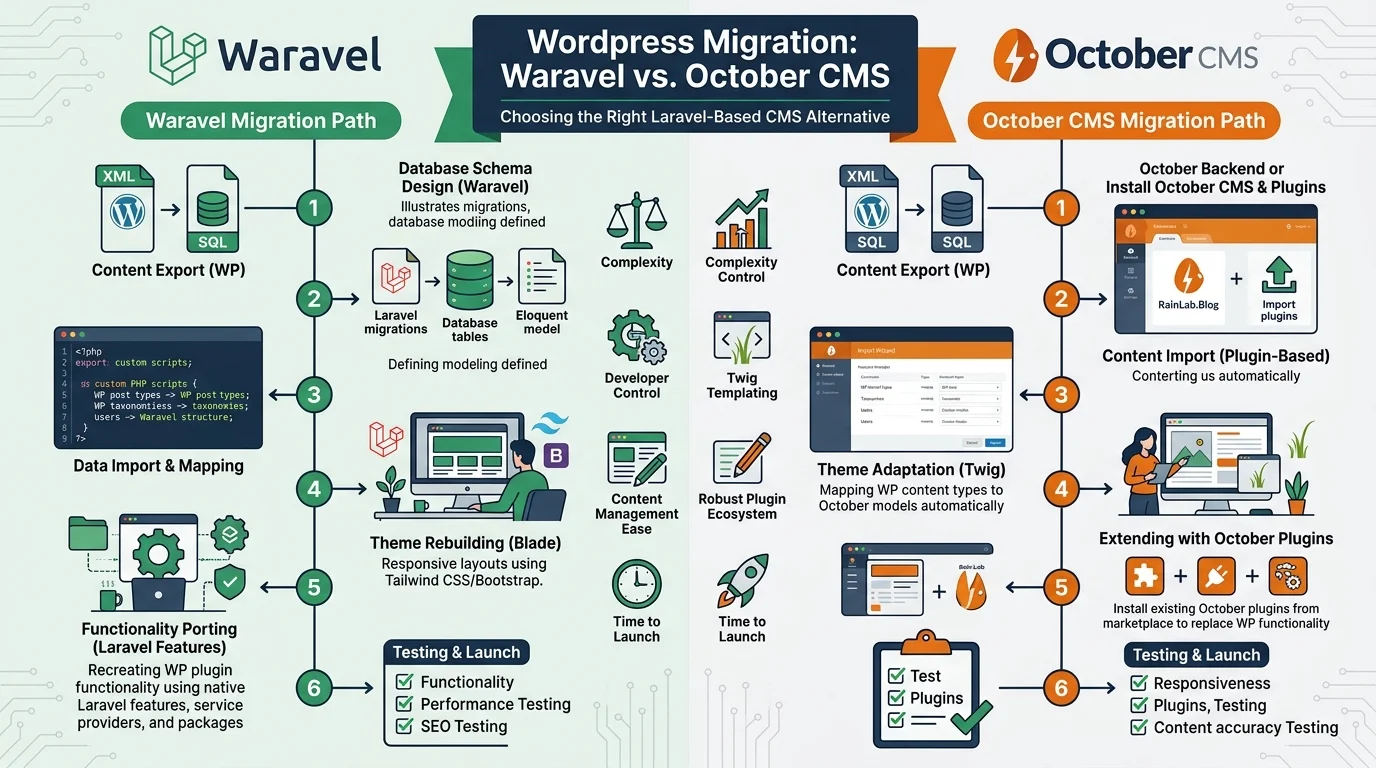
Quick Answer: Which Tool Should You Choose?
Waravel is a specialized WordPress-to-Laravel migration tool designed for automated content, database, and media transfer. October CMS is a full-featured Laravel-based content management system for building and managing websites. Choose Waravel for seamless WordPress migration; choose October CMS if you need a complete CMS platform without WordPress migration automation.
Executive Summary
The WordPress-to-Laravel migration landscape presents businesses with two distinct approaches: purpose-built migration tools like Waravel, and full content management systems like October CMS. This comprehensive comparison analyzes migration capabilities, content management features, development workflows, and total cost of ownership to help businesses make informed decisions about their Laravel modernization strategy.
Whether you're planning a one-time WordPress migration or seeking a complete CMS replacement built on Laravel, understanding the fundamental differences between migration-focused tools and content management platforms is essential for successful digital transformation.
Table of Contents
- Understanding WordPress-to-Laravel Migration Challenges
- What is Waravel? Purpose-Built Migration Solution
- What is October CMS? Laravel-Based Content Management
- Core Purpose Comparison: Migration vs Management
- Migration Capabilities Deep Dive
- Content Management Features Comparison
- Development Workflow and Architecture
- Pricing and Total Cost of Ownership
- Real-World Case Studies
- Frequently Asked Questions
Understanding WordPress-to-Laravel Migration Challenges
The legacy CMS transformation from WordPress to modern Laravel-based architectures represents one of the most significant technical decisions facing businesses today. As organizations recognize the limitations of monolithic WordPress installations — including performance bottlenecks, security vulnerabilities, and scalability constraints — the demand for Laravel migration solutions has surged exponentially.
WordPress powers over 40% of websites globally, but its plugin-dependent architecture, PHP version constraints, and database schema limitations create substantial technical debt. Modern web application replatforming demands robust backend framework migration strategies that preserve SEO rankings, maintain content integrity, and minimize downtime during transition periods.
WordPress-to-Laravel Migration Definition:
WordPress-to-Laravel migration is the systematic process of transferring content, database structures, media assets, and URL architectures from WordPress installations to Laravel-based application frameworks. This includes content migration pipelines, schema mapping and transformation, and backend framework migration to achieve CMS modernization objectives.
The migration ecosystem presents two fundamental approaches: specialized migration tools designed exclusively for WordPress-to-Laravel conversion, and full-featured content management systems that require manual migration processes. Understanding this distinction is critical for selecting the right Laravel application architecture for your business needs.
Two Distinct Laravel Solutions Emerge
Waravel positions itself as a migration-first platform, engineered specifically for automated WordPress content transfer. With native database migration capabilities, URL preservation logic, and media library synchronization, Waravel addresses the core pain point: moving existing WordPress installations to Laravel infrastructure with minimal manual intervention.
October CMS represents the alternative paradigm: a Laravel-powered content management system built for website creation and ongoing content administration. While October CMS provides robust file-based CMS structures, plugin ecosystems, and backend administration panels, it lacks native WordPress migration engines, positioning it as a CMS replacement rather than a migration solution.
What is Waravel? Purpose-Built Laravel Migration Solution
Waravel is a specialized WordPress-to-Laravel migration platform engineered to automate the complex process of content management system upgrade from WordPress to Laravel frameworks. Unlike generic CMS platforms, Waravel focuses exclusively on solving migration challenges through automated content mapping, database structure transfer, and theme-to-Laravel structural conversion.
Waravel Core Migration Capabilities:
- Automated WordPress Database Import: Direct MySQL database connection with intelligent schema mapping to Laravel Eloquent models
- Full Content Migration Pipeline: Posts, pages, custom post types, taxonomies, and metadata transferred with relationship preservation
- Media Library Synchronization: Complete image, video, and document migration with URL rewriting and CDN integration
- URL Structure Preservation: SEO-critical slug mapping, redirect generation, and permalink architecture maintenance
- User Account Transfer: WordPress user roles, permissions, and authentication data migrated to Laravel authentication systems
- WooCommerce Data Migration: Product catalogs, order histories, customer data, and transaction records transferred for e-commerce continuity
- Plugin Data Extraction: Custom plugin database tables analyzed and migrated with data integrity verification
- Theme Structure Mapping: WordPress theme files analyzed for conversion to Laravel Blade template equivalents
Waravel Technical Architecture
Built on Laravel's robust framework, Waravel leverages native Laravel components including Eloquent ORM for database migrations, Laravel Queue for asynchronous processing, and Laravel Filesystem for media management. The Waravel package ecosystem provides modular migration components that can be installed individually or as comprehensive migration suites.
The migration process operates through a multi-phase pipeline: database connection and validation, content inventory and analysis, schema transformation and mapping, data transfer with integrity checks, and post-migration validation. Each phase includes rollback capabilities and detailed logging for troubleshooting complex migrations.
Critical Positioning: Migration-First, Not CMS Replacement
Waravel does not aim to replace WordPress as your content management interface. Instead, it transfers your WordPress content into a custom Laravel application where you maintain full control over frontend presentation, backend logic, and database architecture. Post-migration, you build custom admin panels, APIs, and interfaces using Laravel's ecosystem — or integrate with headless CMS solutions for content editing.
Organizations choose Waravel when they need to escape WordPress limitations while preserving years of content investments. The tool excels in scenarios requiring custom Laravel application development, API-first architectures, or microservices integration where WordPress's monolithic structure creates insurmountable obstacles.
Visit the Waravel registration portal to begin evaluating migration requirements, or explore Waravel pricing plans tailored for small business migrations through enterprise-scale transformations.
What is October CMS? Laravel-Based Content Management Platform
October CMS is a free, open-source content management system built entirely on the Laravel PHP framework. Unlike migration-specific tools, October CMS provides a complete platform for building, managing, and maintaining websites through Laravel's elegant syntax and development patterns. The system emphasizes file-based CMS structures, modular plugin architecture, and intuitive backend administration.
October CMS Key Features:
- File-Based Structure: Theme files, configuration, and content managed through the filesystem rather than database storage
- Backend Administration Panel: Comprehensive dashboard for content editing, user management, and system configuration
- Plugin Marketplace: Extensive ecosystem of community and commercial plugins for extended functionality
- Component System: Reusable building blocks for rapid website construction without custom coding
- Dynamic Layouts: Flexible page layouts with drag-and-drop component placement
- AJAX Framework: Built-in partial updates and dynamic content loading without page refreshes
- Media Manager: Integrated file upload, organization, and manipulation tools
- Multi-Language Support: Native internationalization for global websites
October CMS Development Philosophy
October CMS prioritizes developer experience through Laravel's expressive syntax while maintaining accessibility for non-technical content editors. The platform's component-based architecture allows developers to create reusable elements — blog systems, contact forms, galleries — that content managers can deploy across pages without code modifications.
The backend administration interface provides familiar content management workflows similar to WordPress, making October CMS accessible to teams transitioning from traditional CMS platforms. However, unlike WordPress's plugin-heavy architecture, October CMS maintains cleaner separation between presentation logic, business logic, and data layers through Laravel's MVC architecture.
Critical Limitation: No Native WordPress Migration
October CMS does not include automated WordPress import functionality. Organizations migrating from WordPress to October CMS must manually recreate content, rebuild theme designs, or develop custom migration scripts. While third-party plugins exist for basic WordPress XML export imports, these solutions lack the comprehensive database migration, media synchronization, and URL preservation capabilities required for enterprise migrations.
October CMS positions itself as a platform for building new Laravel-based websites or replacing WordPress installations where complete content recreation is acceptable. For businesses with extensive content libraries, established SEO rankings, or complex plugin configurations, the manual migration burden makes October CMS a challenging direct WordPress replacement.
Core Purpose Comparison: Migration Tool vs Content Management System
Understanding the fundamental difference between Waravel and October CMS requires recognizing their distinct design philosophies. Waravel solves a specific problem: transferring WordPress content to Laravel. October CMS solves a different problem: providing a Laravel-based platform for content management and website development.
| Feature Category | Waravel | October CMS |
|---|---|---|
| Primary Purpose | WordPress-to-Laravel migration automation | Complete Laravel-based CMS for website management |
| WordPress Import | Native automated database migration with content mapping | No native import; requires manual migration or custom scripts |
| Content Management UI | Not included; build custom admin or use headless CMS | Comprehensive backend administration panel included |
| Use Case Timing | One-time or phased migration project | Ongoing website management and development |
| Media Migration | Automated media library transfer with URL rewriting | Manual media re-upload required |
| SEO Preservation | URL mapping, redirect generation, meta data transfer | Manual SEO configuration for migrated content |
| WooCommerce Migration | Native e-commerce data migration including orders and customers | Requires custom development or third-party solutions |
| Plugin Ecosystem | Migration-focused packages and extensions | Extensive CMS feature plugins (blogs, forms, galleries) |
| Learning Curve | Requires Laravel development knowledge for post-migration | Accessible to non-developers through admin interface |
| Ideal For | Businesses escaping WordPress with existing content | New Laravel projects or complete WordPress replacements |
Decision Framework: Which Solution Fits Your Needs?
Choose Waravel If You:
- Have substantial existing WordPress content requiring preservation
- Need automated database and media migration to minimize manual work
- Want to build custom Laravel applications using migrated WordPress data
- Require WooCommerce or complex plugin data migration
- Must maintain SEO rankings through URL preservation and redirect generation
- Plan custom admin interfaces or headless CMS integration post-migration
Choose October CMS If You:
- Are building new Laravel-based websites from scratch
- Can manually recreate WordPress content or have minimal existing content
- Need comprehensive backend administration for non-developer content editors
- Want extensive plugin ecosystem for common CMS features
- Prefer file-based content management over database-driven approaches
- Require ongoing content management rather than one-time migration
For businesses evaluating migration strategies, the Waravel support portal provides migration assessment tools, complexity calculators, and consultation services to determine feasibility and timeline estimates for WordPress-to-Laravel transitions.
Migration Capabilities Deep Dive: Technical Implementation Analysis
The technical sophistication required for successful WordPress-to-Laravel migration extends far beyond simple content copying. Database schema transformation, relationship preservation, and data integrity verification demand specialized tooling that understands both WordPress's legacy architecture and Laravel's modern conventions.
Waravel's Automated Migration Pipeline
Waravel implements a multi-stage content migration pipeline that addresses every aspect of WordPress data transfer. The process begins with database connection validation, ensuring secure authenticated access to source WordPress databases. Schema analysis follows, identifying custom tables, plugin-generated structures, and relationship mappings that must be preserved during migration.
Waravel Migration Process Stages:
Stage 1: Database Analysis & Inventory
Automated scanning identifies all WordPress tables, relationships, custom post types, taxonomies, and plugin data structures. Content inventory includes post counts, media files, user accounts, and metadata volume calculations.
Stage 2: Schema Transformation Mapping
WordPress database schema mapped to Laravel Eloquent model structures. Custom field definitions translated to Laravel database migrations. Relationship preservation logic generated for posts-to-categories, posts-to-tags, and custom taxonomy associations.
Stage 3: Content Transfer & Validation
Batch processing transfers content with integrity checks. HTML content sanitized and transformed for Laravel blade templates. Shortcodes analyzed for Laravel component equivalents. Data validation ensures no content loss during transfer.
Stage 4: Media Migration & URL Rewriting
Complete media library transfer to Laravel storage systems. URL rewriting engine updates all internal content references. CDN integration options for optimized media delivery. Image metadata preservation including alt text and captions.
Stage 5: SEO Preservation & Redirect Generation
URL slug mapping maintains existing permalink structures. 301 redirect rules generated for changed URLs. Meta description, title tags, and structured data transferred. XML sitemap regeneration for search engine reindexing.
Each migration stage includes detailed logging, error handling, and rollback capabilities. For complex WordPress installations with tens of thousands of posts, custom plugin databases, or WooCommerce order histories, Waravel's batch processing prevents memory exhaustion and allows phased migration approaches.
October CMS Migration Limitations
October CMS provides no native WordPress import functionality. Organizations must choose between complete content recreation or custom development of migration scripts. Available third-party plugins support basic WordPress XML export imports, capturing only published posts and pages — excluding custom post types, plugin data, user accounts, and media libraries.
Manual migration workflows for October CMS typically involve: exporting WordPress content to XML, writing custom import scripts to parse XML into October CMS database structures, manually recreating theme designs in October CMS templates, re-uploading media files individually, and reconstructing taxonomy structures. For businesses with substantial WordPress content investments, this manual approach introduces significant time costs and migration error risks.
The Waravel feature comparison portal provides detailed migration capability assessments, including support matrices for WordPress plugin data types, custom post type handling, and WooCommerce entity preservation.
Content Management Features: Post-Migration Workflows
After successful migration, ongoing content management requirements differ substantially between Waravel-powered Laravel applications and October CMS installations. Understanding these operational differences is critical for long-term content strategy planning.
Waravel Post-Migration: Custom Administration Development
Waravel transfers WordPress content into Laravel database structures but does not provide a content management interface. Organizations pursuing Waravel migrations must plan for custom admin panel development, headless CMS integration, or API-driven content workflows. This architectural flexibility enables sophisticated use cases — mobile app backends, API-first architectures, microservices integration — but requires Laravel development expertise.
Common post-Waravel content management approaches include: building custom Laravel Nova or Filament admin panels, integrating headless CMS platforms like Strapi or Contentful, developing RESTful or GraphQL APIs for external content editing tools, or implementing custom React/Vue.js administration interfaces.
October CMS: Comprehensive Backend Administration
October CMS includes a full-featured backend administration panel accessible to non-technical content editors. The interface provides familiar content management workflows: WYSIWYG editors for page content, media managers for file uploads, user management for access control, and plugin configuration for extended functionality.
October CMS's component system allows content editors to add functionality — blog listings, contact forms, image galleries — to pages through drag-and-drop interfaces without developer intervention. This accessibility makes October CMS suitable for organizations with limited technical resources or content teams accustomed to traditional CMS workflows.
Development Workflow and Architecture Considerations
The architectural implications of choosing Waravel versus October CMS extend throughout the entire application lifecycle — from initial development through ongoing maintenance and feature enhancement.
Waravel: Pure Laravel Development Freedom
Post-migration, Waravel leaves organizations with standard Laravel applications containing migrated WordPress data. Developers work within Laravel's familiar ecosystem using Blade templating, Eloquent ORM, and Laravel's extensive package library. This architectural purity enables custom business logic implementation, complex API development, and integration with Laravel-native tools like Laravel Vapor for serverless deployment or Laravel Horizon for queue monitoring.
The absence of CMS constraints allows technical teams to implement sophisticated architectures: event-driven systems using Laravel Events, CQRS patterns with Laravel's command bus, microservices architectures with Laravel service containers, or GraphQL APIs using Lighthouse PHP.
October CMS: Framework Within Framework
October CMS operates as a framework layer atop Laravel, introducing its own conventions, component systems, and architecture patterns. Developers must learn October CMS-specific concepts: components, partials, layouts, and plugin development standards. While this abstraction simplifies common CMS tasks, it constrains architectural flexibility compared to pure Laravel development.
October CMS excels when requirements align with traditional CMS use cases: marketing websites, blogs, corporate sites, or portfolios where content management features outweigh custom application logic needs. For projects requiring extensive custom business logic, complex integrations, or non-CMS application features, October CMS's abstraction layer may introduce unnecessary complexity.
Pricing and Total Cost of Ownership Analysis
Financial considerations extend beyond initial licensing costs to encompass migration effort, ongoing maintenance, development resources, and long-term scalability requirements.
| Cost Category | Waravel | October CMS |
|---|---|---|
| Software Licensing | Subscription-based pricing (see pricing page) | Free open-source (MIT license) |
| Migration Implementation | Low to medium (automated process) | High (manual migration or custom development) |
| Post-Migration Development | Custom admin panel development required | Backend included; minimal setup needed |
| Ongoing Maintenance | Standard Laravel maintenance practices | October CMS + Laravel maintenance overhead |
| Plugin/Extension Costs | Laravel packages (mostly free) | Mix of free and premium plugins |
| Developer Expertise | Laravel proficiency required | October CMS + Laravel knowledge needed |
| Long-Term Scalability | Pure Laravel architecture scales efficiently | CMS overhead may impact large-scale performance |
For detailed pricing information, migration cost estimates, and ROI calculators, visit the Waravel client portal where migration complexity assessments provide accurate budget projections based on WordPress installation size and customization requirements.
Real-World Case Studies: Successful Laravel Migration Outcomes
Case Study 1: E-Commerce Platform Migration
Client Profile
Industry: International Fashion Retail | Previous Platform: WordPress + WooCommerce | Annual Revenue: £12.5M | Product Catalog: 8,400+ SKUs
Migration Challenge
The organization faced critical WordPress performance limitations during seasonal traffic spikes, with page load times exceeding 8 seconds during peak periods. WooCommerce database queries created server resource bottlenecks affecting checkout conversion rates. Legacy plugin architecture prevented implementation of modern payment gateways and inventory management integrations.
Waravel Implementation Approach
Complete WooCommerce database migration including 147,000 historical orders, 89,000 customer accounts, and product catalog with variant structures. Media library transfer of 12,000+ product images with CDN integration. Custom Laravel e-commerce application developed with optimized database indexing and Redis caching layer.
Quantified Outcomes
- 73% reduction in average page load time (8.2s to 2.2s)
- 41% increase in mobile conversion rate (1.8% to 2.54%)
- Migration completed in 6 weeks including testing and validation
- Zero data loss across 147K orders and customer histories
- SEO rankings maintained with 301 redirect implementation
- £180K annual infrastructure cost savings through optimized server requirements
Technical Implementation Details
Waravel automated the transfer of WooCommerce subscriptions, complex product variations with custom attributes, and payment gateway integration data. Custom Laravel package development enabled Stripe, PayPal, and Klarna integration with enhanced fraud detection logic impossible within WooCommerce constraints.
"The Waravel migration process preserved seven years of customer data and order history while enabling performance improvements we couldn't achieve with WordPress. Our development team now operates with pure Laravel, eliminating plugin compatibility concerns." — Technical Director, Fashion Retail Group
Case Study 2: Publishing Platform Modernization
Client Profile
Industry: Digital Media Publishing | Previous Platform: WordPress Multisite | Monthly Visitors: 2.3M unique | Content Archive: 42,000+ articles
Migration Challenge
Multi-author WordPress multisite installation with complex custom post types, taxonomies, and editorial workflow plugins. Performance degradation affecting ad revenue due to slow page rendering. Need for custom API development to power mobile applications and content syndication partnerships.
Waravel Implementation Approach
Phased migration of 42,000 articles preserving category structures, author relationships, and SEO metadata. Custom taxonomy migration from WordPress categories/tags to Laravel-native tagging system. Implementation of headless CMS architecture with Laravel API backend serving React.js frontend and native mobile applications.
Quantified Outcomes
- 89% improvement in API response times enabling real-time content delivery
- 62% reduction in hosting costs through optimized infrastructure
- Migration completed in 8 weeks with zero content publishing downtime
- Custom editorial CMS built replacing 14 WordPress plugins
- Mobile app launch enabled through Laravel API architecture
- 28% increase in programmatic ad revenue due to improved page performance
Technical Implementation Details
Waravel preserved complex relationships between 42,000 articles, 250+ taxonomy terms, 180 author accounts, and embedded media assets. Post-migration, custom Laravel Nova admin panel development provided editorial teams with streamlined publishing workflows impossible within WordPress's architecture constraints.
"Waravel's automated migration eliminated months of manual content transfer work. We now operate a modern API-first architecture serving web, iOS, and Android applications from a single Laravel codebase." — CTO, Digital Media Company
Client Testimonials: Team Waravel Success Stories
"Team Waravel transformed our WordPress nightmare into a high-performance Laravel application. The automated migration preserved 15 years of content while our development team gained the architectural flexibility we desperately needed. Outstanding technical support throughout the process."
Sarah Mitchell
Head of Engineering, SaaS Platform Company
"The WooCommerce migration capabilities exceeded expectations. Team Waravel migrated 200K customer orders, subscription data, and product variations flawlessly. Our Laravel e-commerce platform now handles Black Friday traffic that would have crashed WordPress."
James Rodriguez
CTO, E-Commerce Retailer
"We evaluated October CMS and custom migration approaches before choosing Waravel. The automated database transfer, SEO preservation, and media migration saved an estimated 400 development hours. Team Waravel's expertise made the difference."
Emma Thompson
Technical Lead, Digital Agency
"Migrating from WordPress multisite with Team Waravel enabled our API-first publishing architecture. The content migration maintained SEO rankings while we built custom Laravel applications impossible with WordPress. Best technical decision we've made."
Michael Chen
VP Technology, Media Publishing Group
Frequently Asked Questions: Waravel vs October CMS
Can Waravel migrate a WooCommerce store with subscriptions?
Yes. Waravel includes comprehensive WooCommerce migration capabilities covering products, variations, orders, subscriptions, customer accounts, and payment gateway configurations. Subscription data including renewal dates, payment methods, and subscription status transfers automatically. Custom WooCommerce plugin data can be migrated through Waravel's extensible migration pipeline.
Does October CMS have an official WordPress importer?
No. October CMS does not provide native WordPress import functionality. Available third-party plugins support basic WordPress XML exports but lack comprehensive database migration, media transfer, user account migration, or plugin data handling. Organizations migrating to October CMS must manually recreate content or develop custom migration scripts.
Which is faster: Waravel or October CMS?
Waravel enables faster migrations through automated database transfer, eliminating manual content recreation. For migration speed, Waravel significantly outperforms October CMS's manual approaches. For runtime performance post-migration, Laravel applications built with Waravel-migrated data typically achieve superior performance compared to October CMS's CMS abstraction layer overhead.
Do I lose SEO rankings during migration?
Waravel preserves SEO through URL slug mapping, automatic 301 redirect generation, and meta data transfer. SEO rankings typically maintain or improve post-migration due to performance enhancements. October CMS migrations require manual SEO configuration with higher ranking loss risk. Proper implementation with either platform can preserve rankings, but Waravel automates critical SEO preservation tasks.
Is Waravel compatible with Laravel 12?
Waravel maintains compatibility with current Laravel versions including Laravel 11 and provides migration paths for future Laravel releases. The Waravel support documentation includes Laravel version compatibility matrices and upgrade guides. October CMS also tracks Laravel version support with periodic updates aligning with Laravel release cycles.
Can I migrate only specific content types with Waravel?
Yes. Waravel supports selective migration allowing organizations to transfer specific post types, taxonomies, or date ranges. This phased migration approach enables testing and validation before complete migration. Selective migration proves valuable for large WordPress installations requiring staged transitions or partial content preservation strategies.
What happens to WordPress plugins after Waravel migration?
Plugin functionality must be reimplemented in Laravel post-migration. Waravel extracts plugin-generated database content but does not convert plugin code to Laravel equivalents. Organizations typically replace WordPress plugins with Laravel packages, custom development, or third-party APIs. This architectural shift eliminates plugin compatibility concerns while requiring upfront development investment.
Waravel Migration Services Overview
| Service Type | Description | Typical Duration | Learn More |
|---|---|---|---|
| WordPress Content Migration | Automated transfer of posts, pages, custom post types, and taxonomies with relationship preservation | 2-4 weeks | Details |
| WooCommerce Migration | Complete e-commerce data transfer including products, orders, customers, and subscriptions | 4-6 weeks | Packages |
| Media Library Transfer | Bulk media migration with URL rewriting, metadata preservation, and CDN integration | 1-2 weeks | Features |
| SEO Preservation Services | URL mapping, 301 redirect generation, meta data transfer, and XML sitemap regeneration | 1-2 weeks | Support |
| Custom Plugin Migration | Analysis and migration of custom WordPress plugin database structures and business logic | 3-8 weeks | Register |
| User Account Migration | WordPress user roles, permissions, and authentication data transferred to Laravel systems | 1-2 weeks | Pricing |
| Multisite Migration | WordPress multisite network migration to Laravel multi-tenancy or separate applications | 6-12 weeks | Portal |
| Post-Migration Consultation | Laravel architecture guidance, custom admin development consultation, and optimization services | Ongoing | Contact |
Conclusion: Making the Right Laravel Migration Decision
The choice between Waravel and October CMS fundamentally depends on your organization's starting point and architectural objectives. Organizations migrating from existing WordPress installations with substantial content investments find Waravel's automated migration capabilities indispensable for preserving SEO equity, customer data, and years of content creation efforts.
October CMS serves organizations building new Laravel-based websites where comprehensive backend administration outweighs migration automation needs. The platform's accessible interface and extensive plugin ecosystem support traditional CMS use cases without the complexity of pure Laravel application development.
Key Decision Factors
Waravel Strengths
- Automated WordPress migration
- SEO preservation automation
- WooCommerce data transfer
- Pure Laravel architecture
- Custom application flexibility
October CMS Strengths
- Comprehensive backend UI
- Non-developer accessibility
- Extensive plugin marketplace
- Free open-source licensing
- Traditional CMS workflows
Modern Laravel application architecture demands careful consideration of migration complexity, long-term maintenance requirements, and development team capabilities. Organizations with Laravel development expertise pursuing custom application development find Waravel's migration automation eliminates months of manual transfer work while maintaining architectural purity.
The CMS modernization journey from WordPress to Laravel represents significant technical transformation. Whether through Waravel's specialized migration tooling or October CMS's comprehensive content management platform, successful backend framework migration requires thorough planning, realistic timeline expectations, and appropriate technical resources.
Ready to Begin Your WordPress-to-Laravel Migration?
Discover how Waravel's automated migration platform can transform your WordPress installation into a high-performance Laravel application.
Connect with Waravel
United Kingdom Office
344-348 High Road
Ilford IG1 1QP
United Kingdom